(Update: Sony announced the release of Imagination Studio Suite 2 this week. I’ll be looking it over in the coming weeks and posting an updated review here as soon as it’s done. – Benson)
The Christmas season is quickly closing in on us. While the current economic conditions might be forcing you to take a second look at what you might include on your present list, if you or someone who’s been nice this year are interested in creating your own podcasts or video pieces then you might want to check out something softer on the pocketbook – the Sony Imagination Studio.
A little while back I talked about Sony’s new Imagination Studio Suite, offered exclusively through Dell’s Web site. (Now available at Sony Creative Software’s site, among other places) Dell seems to be moving to the fore on providing PC consumers with a version of Apple’s iLife. First they offered something from Adobe that could be installed on certain XPS systems. Now they are offering Sony’s answer to Apple’s popular suite.
Since writing that post, it has become the most viewed piece on this site, once again hinting to me that there are a lot of people out there interested in finding an answer to Mac fans love of iLife. Also, a lot of people have clicked through to check out the software on Dell’s site. I don’t know if anyone purchased it, maybe Dell would have that info (probably not).
So I decided to give this suite of programs a brief run through.
I had my first run in with the program suite at the 2008 New Media Expo, while hanging out around the Sony Creative Software booth. Voxana and DJ Papi Love from the AcidPlanet Web site were handing out demo copies of the the Imagination Studio Suite to the attendees.

(Me with Voxana and DJ Papi Love from AcidPlanet at the 2008 New Media Expo)
I brought some of the CDs back to ABQ and handed them out to my co-workers and family members. While I don’t think any of my co-workers have picked up the programs yet, I’ve been able to give them a bit of a shakedown, as part of my ongoing search for a PC equivalent to Apple’s iLife package. Sony’s Imagination Studio Suite offers many of the same PC programs as iLife, except for iWeb – but as I’ll point out here, between free blogging sites (such as WordPress or Blogger) and Facebook/MySpace, there is no need for iWeb.
And away we goooooooo…..
Sony Vegas Movie Studio Platinum

Vegas Movie Studio is the video editing software included in the Imagination Studio Suite. The layout of the editing suite is different from Apple’s iMovie – Vegas Movie Studio has a more traditional, linear video editing layout than iMovie does. Vegas Movie Studio has also proven to be a more powerful video editing program than the built in Windows Movie Maker.
In Vegas Movie Studio, the user has separate tracks for multiple video and audio tracks. You can have individual tracks dedicated to dialogue, background music, special effects in addition to multiple video files.
Importing the audio and video elements to a project were easier to import into Vegas than iMovie. With iMovie I found that if I didn’t import just the right file, in just the right way, while hopping on one foot under a waxing moon and preparing a chicken blood sacrifice, the video file wouldn’t import correctly. While with Vegas, a simple click on Project > Import Media opens up a menu showing the importable files. For digital video capture, a quick click on the Capture Video button calls up Vegas’ capture menu.
I found Vegas to be very easy to edit with, I used it to trim and edit video footage of both Barack Obama’s and John McCain’s visit to campus. After editing the video, I was able to export the final video directly to either YouTube, or Sony’s own AcidPlanet.com podcast/video cast/music site. A pop-up screen asked for all of the necessary information to log into either service and input all of the necessary information for the video submission (login and PW, name, description, tags, etc.)
One of the things I had a problem with in Sony Vegas was locating the trimmer, so I could slice video files as necessary without bringing in multiple copies of the same file when adding cuts to the project. This could be user error in part, but I notice in Premiere Pro it’s part of the lower right hand menu, which makes it very easy and quick to make the necessary slices. Update: This was user error. All you need to do to trim down your video in Sony Vegas Studio is place your marker where you want the video to be cut, and hit the “S” key. That’s it! How freakin’ easy is that?!?
Cinescore Studio Plug-In
Vegas Movie Studio, in the Platinum Pack, Platinum Pro Pack and Imagination Studio Suite, comes loaded with the Cinescore Studio plug-in. Cinescore is Sony Creative Software’s soundtrack creation software, and Cinescore Studio is a stripped down version of the program. It’s not an actual program in Imagination Studio, it’s a plug in with Vegas Movie Studio. All you need to do is right click on one of the audio tracks and click “Insert Generated Music” to activate the plug in.

From this menu you can select the type of music you wish and a number of variations of the music you want to include in your project. In the next screen you can select the length of your music file, the composition style and more. Cinescore Studio will then insert it into your movie project. This is a great way to get some quick background music for a podcast or movie scene.
When you are working with the audio section of your project, you can right click on any of these tracks and the “Edit Selection in Sound Forge Studio” appears. Clicking on this allows you to edit the dialogue in Sony’s Sound Forge Studio.
DVD Architect Studio
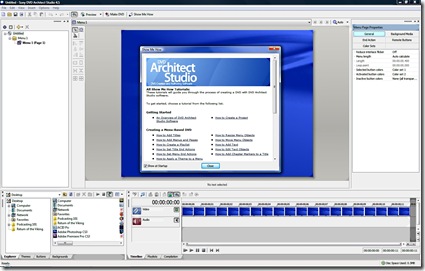
Sony’s DVD Architect Studio is the company’s DVD Menu creation software. Since most people will be uploading videos to Web sites such as your blog, YouTube or AcidPlanet, unless you are creating DVDs for a film project, DVD present, etc. there is a minimal need to use this software.
Should you need DVDs for any reason (family gatherings, etc), DVD Architect Studio is a good choice to create your DVDs. There are many different DVD menu themes for you to pick from, and more are available from the Sony Creative Software Web site.
Sony Sound Forge Audio Studio
One of the programs in iLife that I find to be very beneficial is Garageband, Apple’s audio editing, looping and podcast creation program. Trying to put so many things together in one program can lead to a bit of clutter on the screen, and trying to edit interviews in Garageband leaves these weird bubbles of text in the file that you have to remember to pull back together for a coherent podcast or audio file.
However, Garageband does have a specific setting when you want to record a podcast, with tracks set up for voices, jingles, additional recording, and a window for you to drop and drag artwork for your podcast. And the Garageband browsers are great when it comes to locating files not only by name, but type of file as well. This probably comes from providing so many loops for your specific software package (such as Apple does).
Sony’s got two programs that fill this need for PC users. The first of these programs is Sony’s Sound Forge Audio Studio.
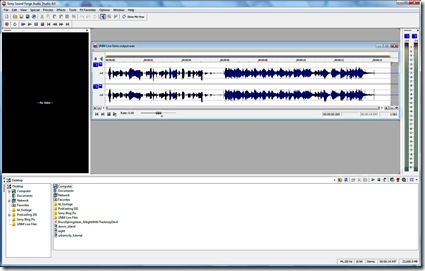
I’ve primarily been using Sound Forge Audio Studio to edit podcasts at the university, and clean up audio in some of the video pieces I’ve been working on. Editing files in this program are as easy as highlighting a bit of text and deleting it, or cutting and pasting the file, or adding various effects to your heart’s content. The best way to figure out which effects you want to use with this powerful program would be to play around with a test audio file and the included effects.
As with Vegas Movie Studio, you can publish your files to the Web, using Sony’s AcidPlanet Web site.
The other half of this tandem of programs is…
Sony ACID Music Studio
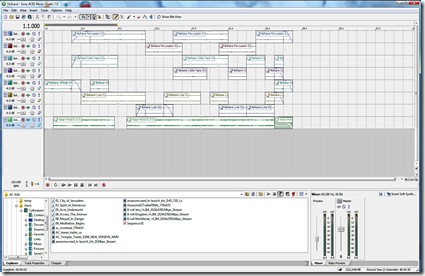
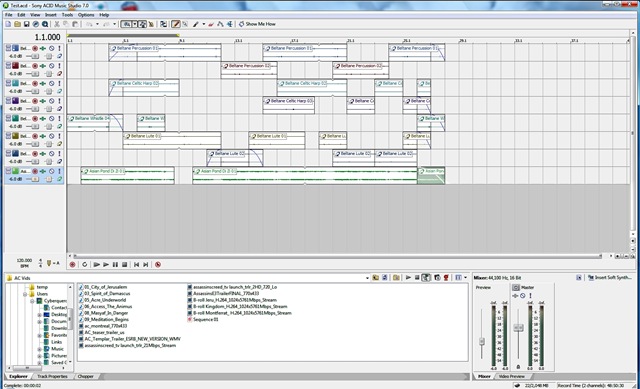
ACID Music Studio is the stripped down version of Sony ACID, Sony’s industry-standard music looping software. Loops are just short music files that sound like one continuous piece of music if they are repeated. When you start combining multiple loops, such as a drum beat, a couple of guitar loops, you can create your own music.
Some of these loops are available on CDs or download from various locations, from many musician stores to Amazon.com (where you will find some pretty good deals) to Apple (if you have Garageband) and Sony Creative Software (which, as expected, work well with ACID). ACID Music Studio comes with a large library of loops at your fingertips after you install it. If you are interested in music loops, a Google search for “Music Loops” will give you many more answers than I can give you right now.
I haven’t spent as much time working with ACID as I have been with Vegas and Sound Forge studios. But I like what I have tried so far with the program. Adding loops is as simple as drag and drop and then using a “brush”-like tool to repeat the loops in each track. I’ll add another update once I have more practice with ACID, and possibly a couple of completed songs on the site.
Photo Go

Photo Go is a cool little program that allows you to keep track of your digital images and do some basic editing to them.
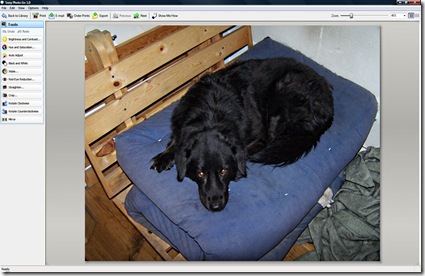
(Awwwww, I always told her she’d be in pictures)
You can color correct images, crop, rotate, remove red-eye, and correct brightness and contrast among the editing features. You can’t sharpen your images, but this is something that can be taken care of using Windows Live Photo Gallery or Picasa 3.
One thing that would be nice would be a way to export your pictures to Flickr or Google’s Picasa. There are simple ways to work around this. Flickr Uploadr allows you to drag and drop pictures to upload to your Flickr account. Or, should you prefer using Windows Live Photo Gallery, you can upload your pictures to Flickr as well.
And then there’s iWeb
I’ve checked out iWeb on the Mac. It’s a cute program that gives you quite a few pre-built templates for various needs for beginners or those not interested in Web site creation. Honestly, it’s easier if you go to WordPress.com (where this blog is hosted) or Blogger.com and create a blog for your basic web needs. You can use your blog as your web page, kind of a “Grand Central You” for your content creation and social media needs.
From your blog page you can link to your Flickr account, YouTube account, upload your podcasts, etc. This serves as a better replacement for your probable web content needs than iWeb. And should you need a Web page presence, you can always check out the templates at Open Source Web Design.
What about help?
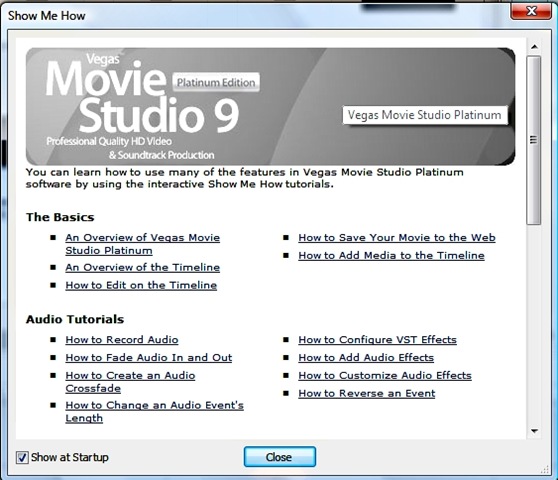
One of the things I like about Sony’s content creation software is that at startup you can allow the “Show Me How” menu of tutorials to pop up, in case you have any questions or want to learn more about what you can do with the software.

These tutorials will take you step-by-step through how to do each of the tasks, with a window going from one part of the screen to the next, highlighting each task and showing you exactly where to click and what to do next. The lessons are quick to follow, not taking more than a few minutes each. I’ve found them invaluable when working with the software.
All in All?
For the price, anywhere from $150-$200 depending on the current discount available at Dell.com, the Imagination Studio Suite fares very favorably when compared to Apple’s iLife suite. Having used both (I have a Mac laptop at work) I find that I actually prefer using Sony’s software. That might be because I’m more used to a Windows set up. This suite of programs give you all but one of the options of iLife, and as I’ve pointed out here, you don’t really need iWeb.
For years PC users have heard Mac users talk about iLife and how there’s nothing on the PC side that can compare with it and how beautifully integrated the programs are, and how iLife is one major reason for people to switch to Mac from PC. There’s a little bit of arrogance behind those statements, but for a while it was hard to locate a simple suite of programs that worked together in an integrated fashion for the PC side. These programs were available separately from Sony Creative Software, but individually they would have cost more than the suite.
If you’re a fledgling podcaster, or YouTuber, or movie maker – or even not so fledgling – you’ll find these programs useful to your endeavors, for the price. It’s the first step before you move on to either the Adobe Production Premium Creative Suite (another set of programs I really recommend when you want to take the next step to more professional tools) or Sony’s professional level tools – Vegas, Sound Forge and ACID Pro (which I haven’t tried).
Rating: 5 rugby balls out of 5.






 Benson Hendrix - Brain for Hire